Credit cards being declined
Why are credit cards being declined on my store?
When you use an online payment gateway to process credit card payments, orders can sometimes decline due to a variety of different reasons. Fortunately, your store records the various responses that come from your payment gateway and places them on the order for your review. This way, you can contact your payment gateway with the applicable error code and simply ask them what it means.
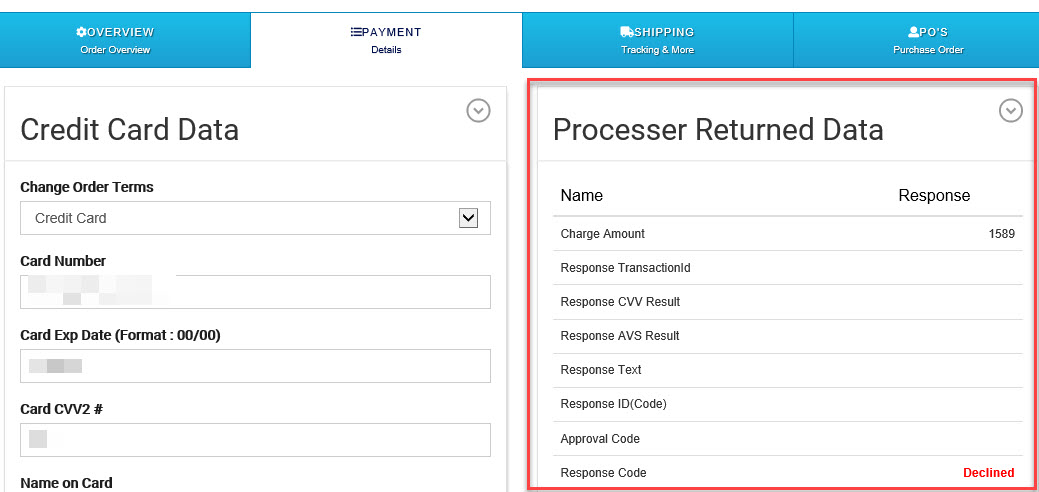
However, if you don't see a response most likely you have not setup you payment gateway or the payment gateway has the wrong credentials. See this link to help you with setting up a payment gateway. If you do not have an online payment gateway use this link to signup for one. In the first example below you can see only a declined response and nothing else. A result like this indicates your gateway is not setup properly.
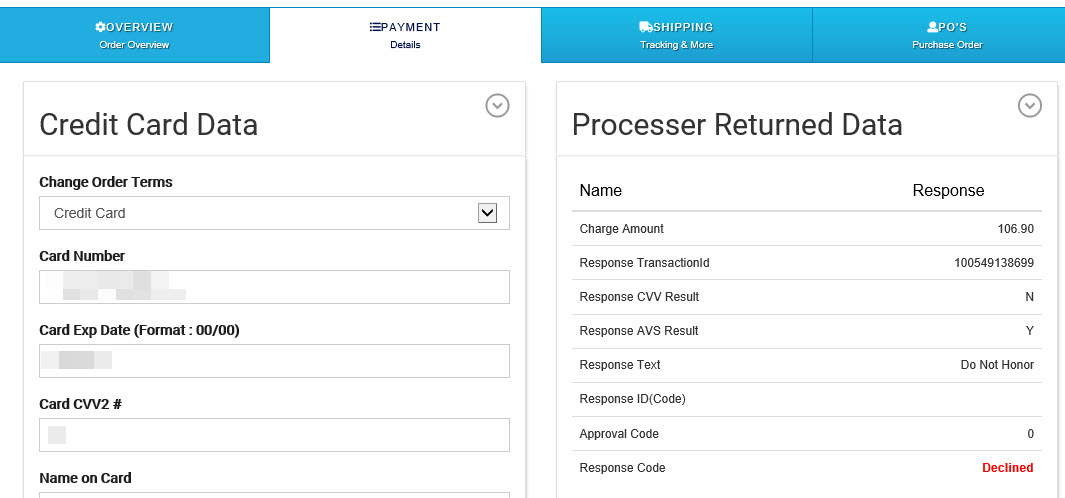
In this example the gateway is setup properly the credit card used was declined by the credit card processor and you will need to contact the customer to update the credit cart details.
If you see a login error then your credentials are incorrect.
From your Power-eCommerce Admin:
- Go to Sales - > Orders to view your store's orders
- Then, click on the Order you are having an issue with
- Click on the Payment Tab
- If you have already tried to charge the credit card view the "Processor Returned Data" section.
This section will only display if there was an actual response from the gateway. - If you see no information here the card has not been charged yet.
- If you do see item "Names" listed but only one or two of the lines has a "Response" entry then your Gateway settings are invalid, the Gateway is not setup for live transactions, or the settings at your Gateway have not been configured properly.
- If you do see most of the "Response"s with data this is usually just that the credit card has been declined for a number of reasons.
- Contact your payment gateway with the response given to see why the decline may be happening.