How do I set up Meta Tags?
Power-eCommerce makes it easy for you to have SEO meta tags on your web pages. Furthermore, your meta tags can be fully customized as you please.
Meta Tags for the "Home Page"
Meta elements provide information about a given web page, and are most often used to help search engines categorize pages correctly. By design, they are often inserted into the HTML code but are not visible to a user looking at the site. The most commonly used meta tags are the meta keywords, meta description and meta abstract tags.
- Title:
The meta title of your web page gives searchers and search engines a brief description of its content. It is visible at the top of the page tab in many web browsers and is saved as the title of a bookmark if a user saves it. The meta title is a critical component of search engine optimization.
- Keywords:
The "keywords" meta tag allows you to provide additional text for crawler-based search engines to index along with the content of your page. These keywords should be relevant to the content of the page since some search engines use these tags to also detect spam content. - Description:
The "description" meta tag provides a concise explanation of a web page's content. This allows the webpage author to give a more meaningful description for listings than what might otherwise be displayed if the search engine was to automatically create its own description; based on the page content. The description is often, but not always, displayed on search engine results pages, so it can impact click-through rates as well. The major search engines also consider keywords located in the description meta tag when ranking pages.
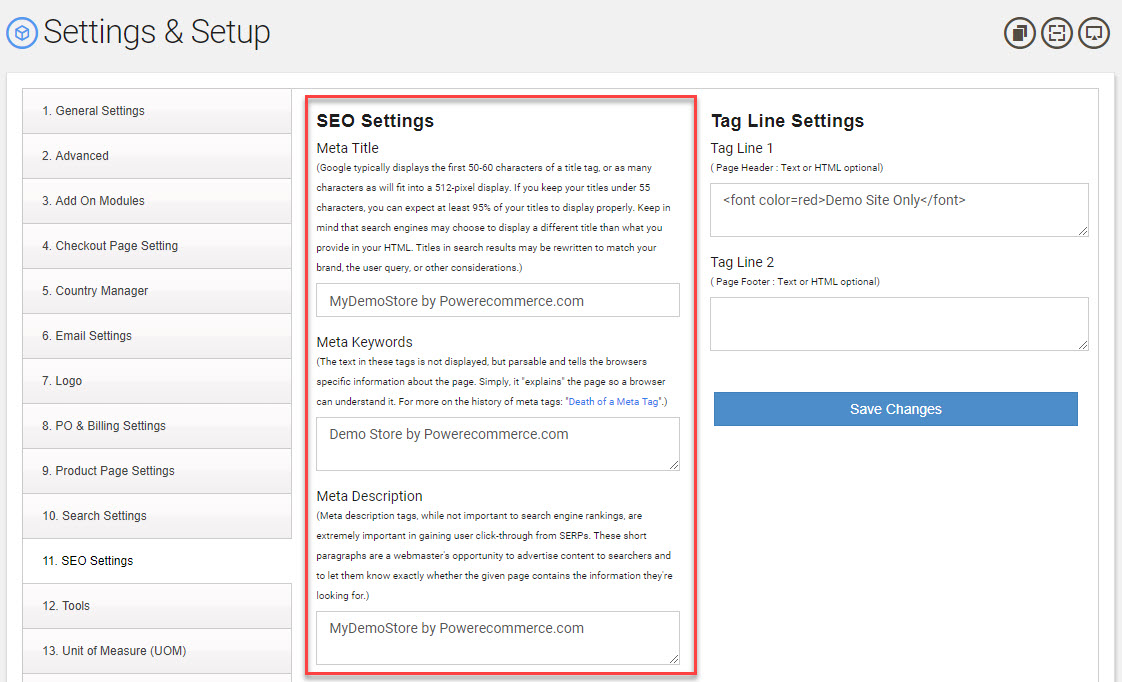
- Go to Setting -> General Settings
- Click the Tab "SEO Settings"
- From there change the fields "Title", "Keywords" and "Description" as needed.
- Read the Descriptions above to help you in you changes.
- Click "Save Changes"
Meta Tags for the "Product Pages"
Power-eCommerce dynamically create custom meta tags for all your product pages. This function uses the information from the product name, category, description and keywords fields. You also have the ability to manually specify your own custom meta tags for each product if you wish. This can be done from your admin by following these steps for each product listing you wish to change.
- Go to Products -> Product List.
- Select the product you wish to make changes to.
- Click on the "Options" Tab (see screenshot below).
- Now Click on the "SEO Options" Tab (see screenshot below).
- From here add your own "Meta Tile"
- Add or edit your "Product Keywords" also used for meta tag and product search.
- Add a custom "Product Description" for Meta Description use. (this does not effect the product Description a customer sees on your store).
- Click "Save Changes"
