Category Types
You can manage your categories & product offerings under each category with your stores Category Manager. Categories can be used to group similar items together and give your store a intuitive design. There are five types of Categories.
- Category Groups.
- Categories
- Sub-Categories
- Categories & Sub-Categories with Products listed under them
- Primary Categories
Here we will enplane in more detail what each of these category types are designed for:
Category Groups : This is the highest level Category that is displayed 1st in your stores Category Menus. For example "Health & Fitness", "Office Supplies" or "Computers & Tables" under these main Category "Groups" you will place your Categories (these categories can have Sub-Categories[see more below on Sub-Categories] or they can have products listed under that category).
Categories: Categories will be assigned to a Category Group. This is where the Category will be displayed in your store. These are the main categories for the Category Group its assigned to. This is where you break down the main areas of this category Group. See an example of how a Category is used below:
"Office Supplies"
Copier & Printer Paper
Envelops & Forms
Office Furniture
Calendars & Accessories
"Computers & Tables"
Desktop Computers
Laptops & Accessories
Tables & Accessories
Software & Utilities
Networking
Sub-Categories : These work like Categories above except they have a "Parent" Category and are listed under the "Parent" Category. These Sub-Categories can have there own categories under them and those Sub-Categories can have Sub-Categories under them and so on (there is no limit on how far you can drill down in your categories, we do not recommend drilling down more than 3 Sub-Categories to keep it user friendly; However, some industries like automotive parts can have a large category tree to be sure the customer gets only the items they need. 3 Sub-Categories is just a standard but Your business needs will have there own needs). Here is an example of a Category Tree with Sub-Categories:
"Computers & Tables"
Desktop Computers
All-In-One PC's
Desktops
Gaming PC's
Workstations
Servers
Laptops & Accessories
Windows Laptops
Docking Stations
External Drives
Laptop Cases
MAC Laptops
Docking Stations
External Drives
Laptop Cases
Gaming Laptops
Docking Stations
External Drives
Laptop Cases
Accessories
Docking Stations
Drives
SSD / Solid State Drives
Hard Drives
2.5 inch Drives
3.5 Drives
External Hard Drives
External Drives
External SSD Drives
Laptop Cases
Replacement Batteries
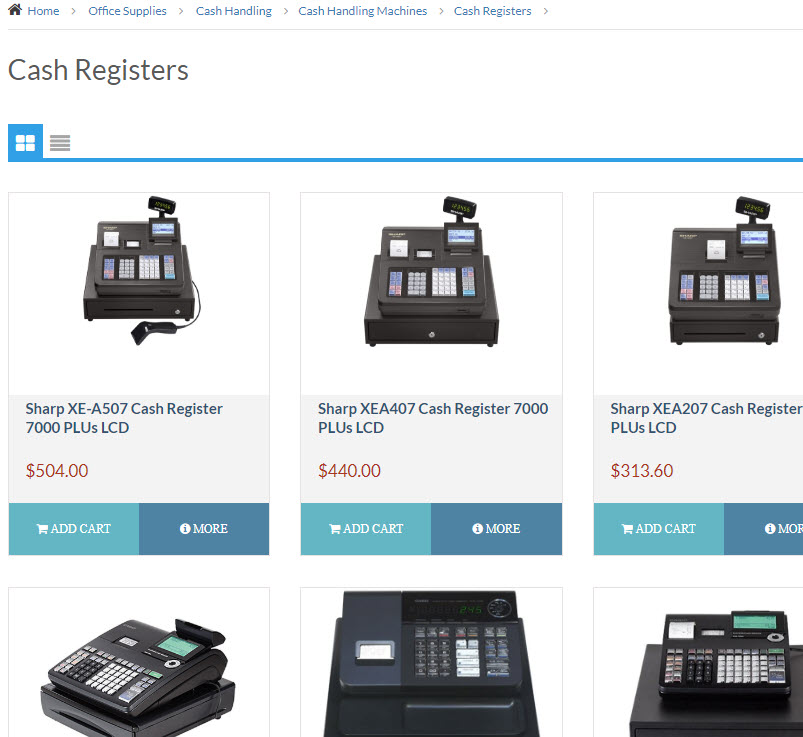
Categories & Sub-Categories with Products listed under them: This is the pay off category where you like all the products that you wish to go under this Category or Sub-Category. When your store's user click on this Category or Sub-Category they will be shown a list of products that have been added to this Category or Sub-Category. Here is an example of products listed under "Cash Registers"
Primary Categories : This can be a Category or Sub-Category. A Primary Category is a category that references a different category and displays the referenced categories products or sub-categories under the Primary Category. This is very useful if you have more than one Category or Category Group that this Category should go under but instead of having to manage 2 different categories you just manage one and reference the other one so it duplicated the categories properties like sub-categories or products. Here is an example of how this can work.
"Office Supplies"
Copier & Printer Paper
Envelops & Forms
Office Furniture
Ink & Toner
Brother
Canon
Dell HP
Epson
Xerox
Calendars & Accessories
"Computers & Tables"
Desktop Computers
Laptops & Accessories
Tables & Accessories
Ink & Toner Supplies
Brother
Canon
Dell HP
Epson
Xerox
Software & Utilities
Networking
In the above example the Category in "Blue" are a standard Category or Sub-Category. The Category "Red" is a Primary Category that is referencing the Category in "Blue". As you can see the Sub-Categories of the Category in Blue are displaying under the Red Primary Category(that is referencing the Category in "Blue"). This works for both Categories with Sub-Categories or products listed under them.
To make a Category or Sub-Category. a "Primary Category" just add the referencing category ID to the
"Primary Category ID" setting when editing the .Category you wish to be a Primary Category.
To Edit or Add Categories Please Read this article: How to edit a Category or Sub-Category