Manufacturers and Settings
Your products can be Manufacturer to help customers search for products as well as other important functions/features. Listed below are the settings options for your Manufacturers.
To Manage your Manufacturers:
- Go to Products -> Manufacturers.
- Navigate to the Manufacturer you wish to edit and click "View"
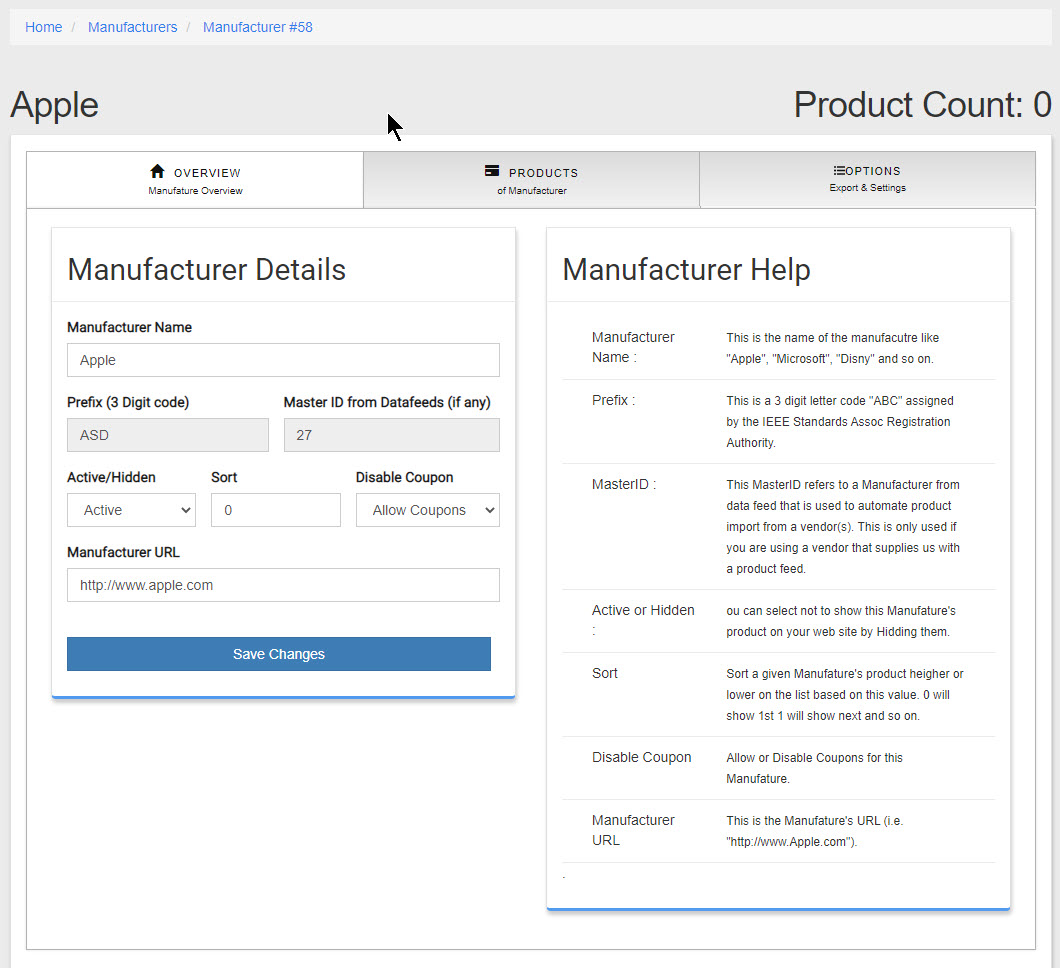
- See below for Adding and Deleting Manufacturers.
- Manufacturer Name : This is the name of the Manufacturer like Apple, HP, Canon, Samsung and so on.
- MasterID : if a product has a MasterID that is greater than "0" (i.e. 1234) then this Manufacturer was added to your site from a vendor you have a datafeed with (where the vendor sends data to keep your products update date). See Datafeeds under the Products menu.
- Prefix : This is a 3 digit code that is assigned to a Manufacturer by an international body to help identify Manufacturers and aid in product management.(if this Manufacturer was added from the Master list of Manufacturers and has a MasterID it can not changed)
- Active or Hidden : By default Manufacturers are "Active"
Active setting will show the products that have this Manufacturer on your web site/store.
Hidden setting will hide all products with this Manufacturer on your web site/store so no customers will see products by this Manufacturer. The products will still be visible in your admin. - Sort : This allows you to sort Manufacture's product higher or lower on the list based on this value. 0 will show 1st ;1 will show next and so on.
- Disable Coupon : Allow or Disable Coupons for this Manufacture.
- Manufacturer URL : This is the Manufature's URL (i.e. "http://www.Apple.com").
To Add a new Manufacturer:
- Go to Products -> Manufacturers.
- At the Top right of the List of Manufacturers you will see a "Add MFG" in green click on that.
- A new page will display where you will need to enter all the details for the new Manufacturer.
- Do not forget to finish by clicking "Add Manufacturer" once you have filled in the form.
To Delete/Remove a Manufacturer:
- Go to Products -> Manufacturers.
- Navigate to the Manufacturer you wish to delete. Do this by searching for Manufacturer.
- If the Manufacturer you are looking to delete does not have any products associated with it you will see a "Delete" button in red. If the Manufacturer is associated with or is linked to a product(s) then you will see "In Use" grayed out. In that case you will not be able to delete the Manufacturer until you unlink the product or products from this Manufacturer.