Product Classifications
Product Classifications are used to put a set of products in a like "Class". Here are some examples of product Classification.
Simple:
- color
- Office Supplies
- Food Items
More complex:
- "Apple, iPhone, Cases"
- "Toner, Brother, Generic brand"
- "Grocery, Kellogg's, cereal, organic"
Product Classifications can be as simple or complex as you need them to be. Below are some use cases for Product Classifications.
Use Cases:
- Pricing Rules based on a Product Classification.
- Exporting Products to a shopping site.
- Hiding a Class of products from in a Product Classifications on your web site/store.
How to manage your Product Classifications:
- From your Admin go to : Products -> Product Classification
- To add a new Product Classification click on the Green button "Add New Classification"
- To Edit an existing Product Classification find the Product Classifications you need to edit and click on "View"
- Classification Name : This is the name of the Classification Like T-Shirts, Computer Parts, Office Supplies and so on.
- Active or Hidden : If you Hide a Classification any products with this Classification on your store/web site will be hidden from all customers. It does not delete the products just hides from the web site/store. You will see see the products in your Admin.
- Sort : Sort a higher or lower on the list based on this value. 0 will show 1st, 1 will show next and so on.
- Allow Export to Comparison Shopping Engines : If you are using the Marking tools for Comparison Shopping Engines this option helps you restrict what product Classifications will be added to a given Shopping Engine.
Add a Product Classification to a Product:
Once you have added some product Classifications you can link them to a product(s).
- From the admin select the product you want to link this Classification to.
- Click on the "Options" Tab and look for the drop down menu "Product Classification".
- Select the Classification you want for this product.
- Click "Save Changes"
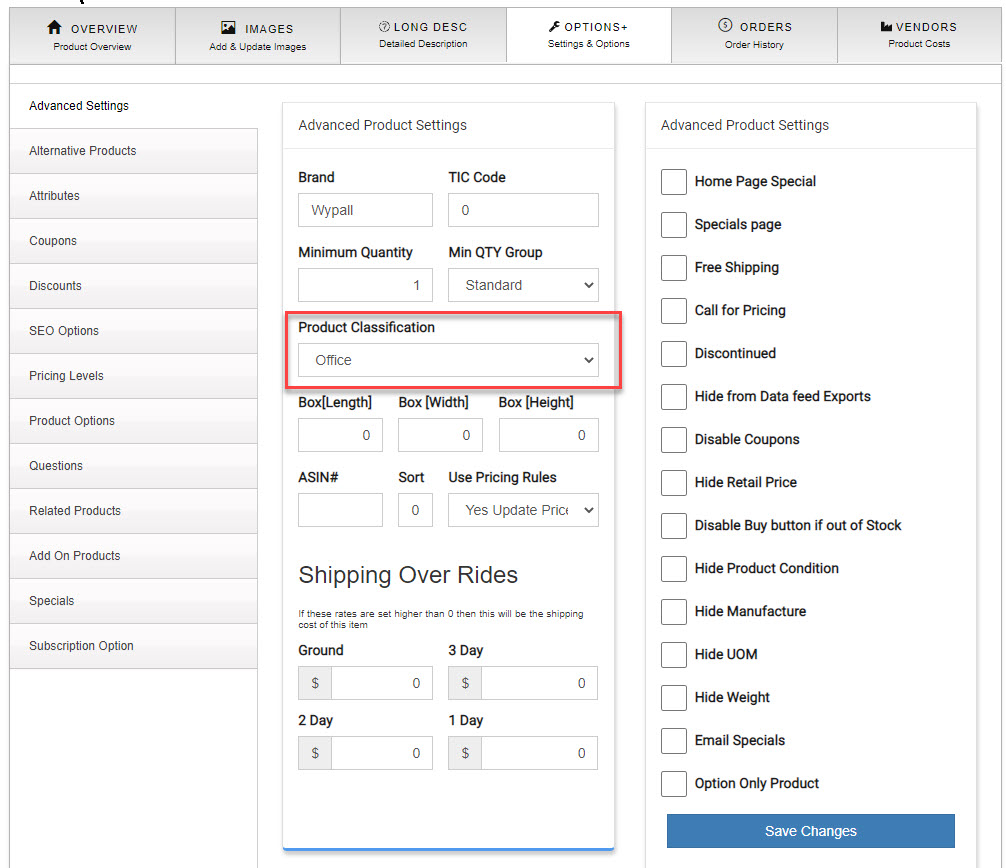
- You can also use the product import/upload tool to add these in bulk.