How to setup Free Shipping for Orders Over $xx.xx?
You may want to only give free shipping to orders that are over a certain amount of money. To do this, you will need to use the Shipping Manager to give Free shipping when the order has $X or more worth of products.
- Go to Setting -> Shipping Manager
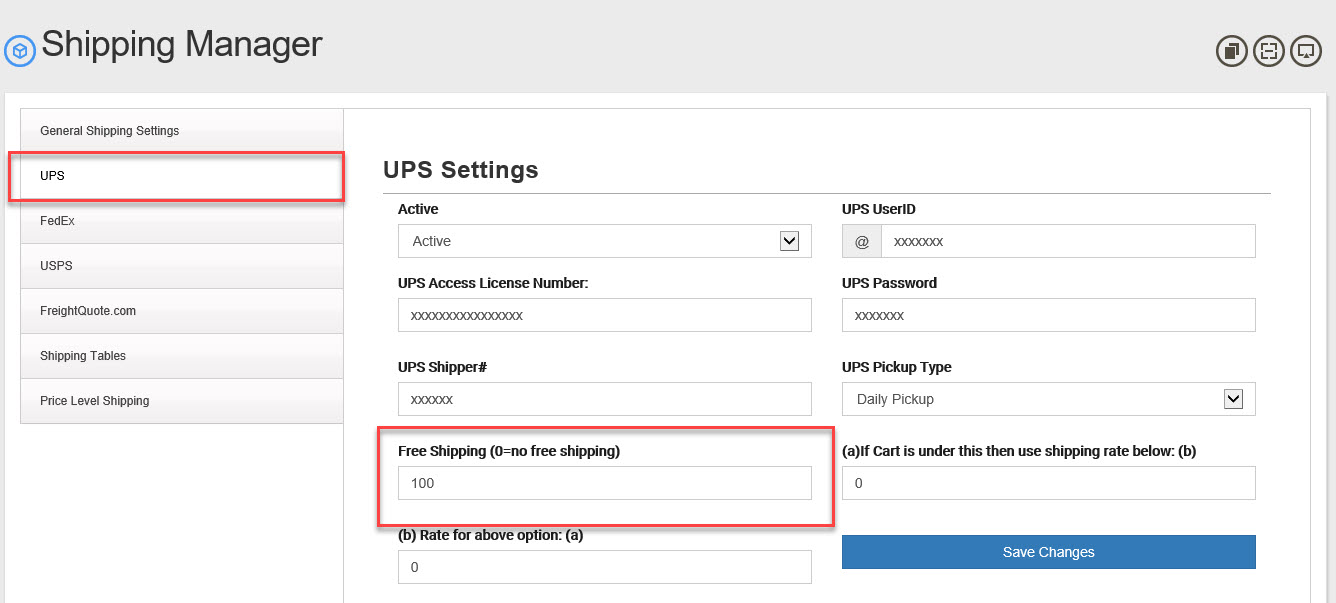
- Click the Shipping Type you work with (UPS, FedeEx, USPS, Shipping Tables and so on). They all work the same but we will show you "UPS" as an example here.
- Look for "
- Setting this to 0 (zero) results in no free shipping.
- Setting this to anything over $1.00 will give free shipping when the total cost of the items in the shopping cart are equal to or grater than that number.
- Set the "Free Shipping (0=no free shipping)" to $100 and all order over or equal to $100 will be given free ground shipping.
- Click "Save Changes"